How to use the Boundary Strips to block off RoboVac?
For RoboVacs that work with boundary strips (Which RoboVacs work with boundary strips ), you can apply the boundary strips on flat surfaces to block off your RoboVac.
The boundary strips need to be taped down. They come with double-sided tapes.
Below are recommended steps:
1. Measure the length of the strip you might need.
2. Cut the boundary strip vertically.
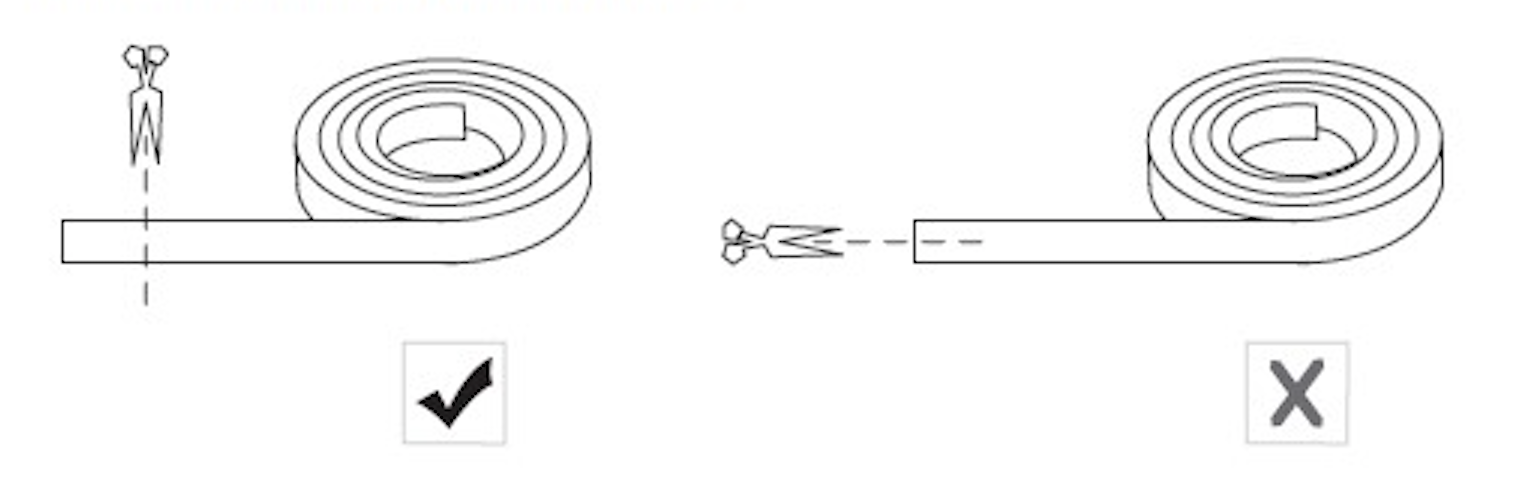
3. Stick the 3M adhesive tape on the boundary strip.
4. Apply the strip on the hard and flat floor. The side with the "eufy" logo should face upward.
The boundary strips need to be taped down. They come with double-sided tapes.
Below are recommended steps:
1. Measure the length of the strip you might need.
2. Cut the boundary strip vertically.
3. Stick the 3M adhesive tape on the boundary strip.
4. Apply the strip on the hard and flat floor. The side with the "eufy" logo should face upward.


20 undefined
What if my RoboVac stops in the middle of cleaning with Three Beep Error?


What if my RoboVac stops in the middle of cleaning with Four Beep Error?
How to order waterproof pad for my RoboVac (Hybrid version only)?
How to order a mopping module for L70 Hybrid?
How to order a remote control for my RoboVac?
Can RoboVac work with my carpets/floor? (for Bounce Series)
What to do if my RoboVac does not Run with Schedule on Remote Control
What should I do if my L70 Hybrid stops with an Error 4 / Error S5 voice alert?
What if my RoboVac has a clicking noise in the side brush?
How long the RoboVac L70 Hybrid can mop?

RoboVac 35C/25C_Manual_EN
Download
RoboVac G30 Series/G40 Series EU DOC (T2250/T2251/T2252/T2253/T2254/T2255/2256)
Download
RoboVac G20_Manual_EU
Download
RoboVac 30C/35C/15C/15T(T2118/T2117/T2120/T2115)EU DOC
Download
RoboVac 30 (T2116)_UKCA&EU Declaration of Conformity
Download
RoboVac L70 Hybrid_Quick Installation Guide_EN
Download
View More
RoboVac 30C Quick Start Video (other WiFi RoboVacs of Bounce series are similar)
How to Replace Bumper of RoboVacs
Troubleshooting if RoboVac Cannot Power On
How to Use the Mop Function of G10/G20/G30 Hybrid
RoboVac Battery Replacement and Installation Video (for 11S series)
How to Replace the Swivel Wheel for the Max and G series RoboVacs
View More


